Bookkeeping & Invoicing
Reports
You can print a number of reports from Bookkeeping & Invoicing under
If you want to import or export different registers or SIE files, this is done under Settings - Import and export. You can also read more in the topic Import and export.
You can read more about each report below.
 Accounting transaction log
Shows what transactions that have been carried out, when they were carried out and by whom, for the selected financial year or period.
Aged analysis invoice report
The report shows unpaid invoices with a breakdown of how old the debts are for the overdue invoices. You can run the report for your
Balance sheet
The balance sheet gives you an overview of assets, liabilities and equity. Depending on what selection criteria you choose, you can view the account number, account designation, opening balance, change during the period, balance, balance for this period and closing balance.
The last line shows the net profit/loss. Preliminary balance sheet is shown if you have not locked the company's accounting for the selected financial year or period.
If there are any open accounting periods prior to the one you are printing, the balance sheet will be marked as preliminary. Read more about the locking of accounting periods and financial years in Financial year and OB settings.
Chart of accounts
The chart of accounts report lists the various accounts in numerical order. It also indicates the VAT codes and whether the accounts are active.
You can choose whether you want to include active and inactive accounts.
Customer ledger
With this option, you can print a customer ledger for each customer for a specific financial year or set period of time. The ledger gives you an overview of information such as which customers who have unpaid sales invoices and when they are due.
The date you have specified for the period determines what is shown in the report. If an invoice payment has been made after the selected period it will not be included in the report, and the closing balance shown is the claim present at the end of the period.
In the same way, the opening balance shows how much money that has been claimed for overdue invoices in the period before the report start date. This is a good indicator of whether there are old and unpaid sales invoices.
Customer list
Based on a filter, you can generate a list of active and inactive customers, including information such as number, name, contact details, status, and if you wish, personal identity number or organisation number.
Fixed assets list
The detailed fixed assets list helps you reconcile the accounting of your asset accounts against your fixed assets. You select financial year or transaction date(s) and what fixed assets category you want to reconcile. The report shows the Cost of acquisition, Date of acquisition, Depreciation for period, Depreciation prior to selected period, Opening balance for period and Carrying amount.
Please note that if you have fixed assets for which you have specified previous depreciations, the content in the columns Depreciation prior to selected period and Depreciation for period of the report depends on what period you choose to run the report for.
Example
You have a fixed asset for which you have specified previous depreciations according to the below:
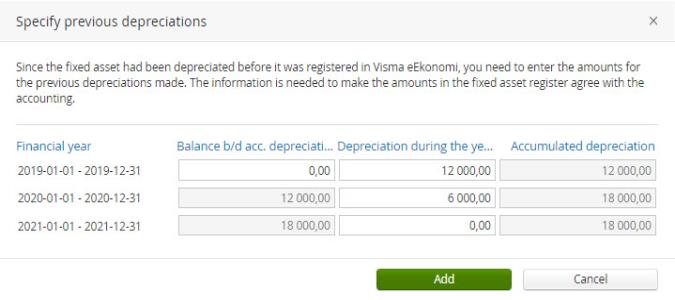
Depending on which period you choose to run the report for, the values will be accounted for like this:
| Report period | Depreciation prior to selected period | Depreciation for period |
|---|---|---|
| 2020-01-01- 2020-06-30 | 12 000 kronor | 6 000 kronor |
| 2020-06-01 - 2020-06-30 | 18 000 kronor | 0 kronor |
Since Bookkeeping & Invoicing does not know if the depreciations made during 2020 were made during June specifically, they will be accounted for in the period prior to the period selected for the report.
Fixed assets list, detailed
The detailed fixed assets list helps you reconcile the accounting of your asset accounts against your fixed assets. You select which period you want to generate the report for and what fixed assets category you want to reconcile. The report shows the Date of acquisition, Cost of acquisition, Depreciation basis, Depreciable amount, Useful life (months), Depreciation prior to selected period, Depreciation for period, Accumulated depreciation, Carrying amount and Status.
Please note that if you have fixed assets for which you have specified previous depreciations, the content in the columns Depreciation prior to selected period and Depreciation for period of the report depends on what period you choose to run the report for.
Example
You have a fixed asset for which you have specified previous depreciations according to the below:
Depending on which period you choose to run the report for, the values will be accounted for like this:
| Report period | Depreciation prior to selected period | Depreciation for period |
|---|---|---|
| 2020-01-01- 2020-06-30 | 12 000 kronor | 6 000 kronor |
| 2020-06-01 - 2020-06-30 | 18 000 kronor | 0 kronor |
Since Bookkeeping & Invoicing does not know if the depreciations made during 2020 were made during June specifically, they will be accounted for in the period prior to the period selected for the report.
Journal entries list
Use this report if you want to print a list of journal entries. The journal entries list also gives you transaction information. You can sort the list by Journal series
If you want to print an individual journal entry you can sort the list by Journal entry number and enter the journal entry's sequence number in both of the Record no fields. You can also print the individual journal entry from the list under Accounting - Journal entries. Click on the specific entry you want to print. You then select Create PDF, open the PDF file and print it.
If there are any open accounting periods prior to the one you are printing, the journal entries list will be marked as preliminary. Read more about the locking of accounting periods and financial years in Financial year and OB settings.
Ledger
The ledger can be obtained for any period as well as for a specific project. The ledger lists the ledger accounts in order. You can view all transactions registered on each account for the requested financial year or period. The transaction date and number is shown for each transaction.
The selection criteria available, e.g specific accounts and date intervals
The Moms column shows the VAT on the amount if the journal entry line has a VAT code where the VAT can be calculated automatically.
If there are any open accounting periods prior to the one you are printing, the ledger will be marked as preliminary. Read more about the locking of accounting periods and financial years in Financial year and OB settings.
Ledger account balances list
The ledger account balances list shows a compilation of the balances of specified accounts for the set period. The list shows account number and name, opening balance, debit and credit balances, difference and closing balance. The ledger account balances list can e.g help you reconcile the posted balance of the cash account against the money in petty cash when you count it.
Monthly recap
A pop-up report that will guide you through the past month and show you for example how much you have invoiced, who was your best customer and compare your result with the previous month. On the first day of each month you will get a notification that a new Monthly recap is available for you.
Multiple sales invoices
Use this report if you want to create a PDF based on the invoice number range that was created when you used the feature Select multiple customers on an invoice. Select a date and pick an invoice number range from the list to find the invoices you want to be included in the PDF. The list will be empty if you have not used the Select multiple customers feature on the specified date.
OSS report
This report shows the company's turnover for goods and services to private individuals in other EU countries. The amounts are indicated in Euro. The report can be used as underlying data when reporting a tax return to .
Period allocation report
Using this report, you can compare the balance of the allocation accounts against any planned period allocations. You select the dates and the accounts you performed allocations on. Keep in mind that the report only shows the allocations that have not yet been carried out. To view any prior, fully executed allocations, go to Accounting - Journal entries and select Transaction type - Period allocations.
Income statement
This report provides an overview of the revenue and costs for a financial year or a selected period of time. In addition, you can create a report comparing the results with those of the previous year.
If there are any open accounting periods prior to the one you are printing, the profit and loss report will be marked as preliminary. Read more about the locking of accounting periods and financial years in Financial year and OB settings.
Project list
This report provides an overview of your projects. You can choose to print single, multiple or all of your project. The report contains project number, project name, assigned customer, start and end date.
The report can be opened, saved and printed in a PDF or CSV format.
Sales invoice list
This report will give you an overview of your sales for the selected period. There is also a possibility to select specific invoice numbers.
Sales statistics
The report will give you an overview of the sales statistics of sold articles or customer purchases for the period you have entered, depending on if you choose to base the report on article or customer statistics. If you have added labels to your customers and articles you can filter the report further by selecting which labels to include.
If you have entered the purchase price for articles during the selected period, the report will also show purchase price, contribution margin in SEK, contribution margin in % and the contribution margin per unit. If the contribution margin field is empty in the report, it means that the total amount could not be calculated because one or more articles are missing a purchase price or price records for the selected period. In the report you can also see the total sales as well as filter your statistics by project.
Contribution margin calculation when using the stock extension
When you use the stock solution, each individual article is kept track of and the purchase price and freight cost they originally had. This makes the calculation of the contribution margin very accurate. Please note that you may get different numbers for the contribution margin on the invoice and in the report. The reason for this is that the calculation of the contribution margin on the invoice is based on the current price on the article while the calculation in the sales statistics report takes the prices from all the inbound deliveries into account. When the purchase price has differed between the inbound deliveries the calculation of the contribution margin will show different numbers on the invoice and in the report.
CM of 100% due to negative stock balance
If you have created invoices with more articles than you had registered in stock, thus causing a negative stock balance, the purchase price and freight cost will be set to 0 SEK. Which in turn will give you a calculated contribution margin of 100%. This will be adjusted and recalculated in future reports, as soon as you have registered an inbound delivery with the correct purchase price and freight cost for the article.
Sales statistics monthly
This report is similar to the Sales statistics report, but focuses only on article statistics. You can filter on article numbers, article labels, projects, and cost units. Project and cost unit filters are only available if they are used. The report printout includes the columns: Article number, Article name, Statistics, and a column for each month selected.
-
If an article has not been included in at least one invoice in the period, the Amount and Total sales excl. VAT columns will be left empty.
-
If an article has been used on both a sales invoice and a credit note in the same period, the Amount and Total sales excl. VAT columns will show 0.00.
-
If an article has been included in a sales invoice one month and in a credit note in another month, you will see a positive amount for the first month and a negative amount for the other month in the Amount and Total sales excl. VAT columns.
Stock value report
The stock value report gives you a snapshot of the number of articles in stock and their value at a given date.
If you have had a negative stock balance for an article on the date that you view the report for, you can select whether or not the negative stock value should affect the total stock value, by ticking the box Allow articles with a negative stock balance affect the stock value. Please note that a negative stock value only can be calculated if you later have registered an inbound delivery, for the article with the negative stock balance, with updated purchase price and freight cost.
Supplier ledger
With this option, you can print a supplier ledger that provides information about each supplier for a specific financial year or set period of time. The ledger gives you an overview of all the invoices from the supplier. If you only want information such as which purchase invoices that remain unpaid and when they are due you can instead print the report Unpaid purchase invoices list.
The date you have specified for the period determines what is shown in the report. If an invoice payment has been made after the selected period it will not be included in the report, and the closing balance shown is the debt present at the end of the period.
In the same way, the opening balance shows how much money that is owed for overdue invoices in the period before the report start date. This is a good indicator of whether there are old and unpaid purchase invoices.
Unpaid purchase invoices
This list shows your unpaid purchase invoices up until the selected date, sorted by due date.
Unpaid sales invoices
This list shows your unpaid sales invoices up until the selected date, sorted by due date.
VAT report
The VAT report is not found among the other printouts. If you want to print the VAT report go to Accounting - VAT report and click on the specific report you want to print. You then select Create PDF, open the PDF file and print it.
Related topics

|
Print reports |
|
|
How do I reprint an invoice? |