Payroll
Adjust values for net holiday for employees with intermittent working hours
When you move from Visma Lön 600 to Spiris using Flytthjälp, holiday days and holiday pay per day are normally transferred.Payroll An exception applies to intermittent employees with net holiday. If their holiday values are rounded, the number of holiday days and the holiday pay per day won’t be transferred automatically.
The holiday calculation method (gross holiday or net holiday) is transferred automatically. The holiday values that form the basis for the next holiday year are also transferred, such as holiday accruing pay, holiday accruing variable pay and holiday accruing leave.
Here’s how to adjust the values manually:
Start by retrieving the report you’ll use when entering the information in Spiris Payroll.
- Open Visma Lön 600.
- Go to Utskrifter och Spårning - Utskrifter - Semester, the report Nettosemestervärden.
- Click Förhandsgranska or print the report.
If the report contains several periods, use the information from the last period – the one that applied when the information was transferred to Spiris Payroll.
Example of what the report looks like:
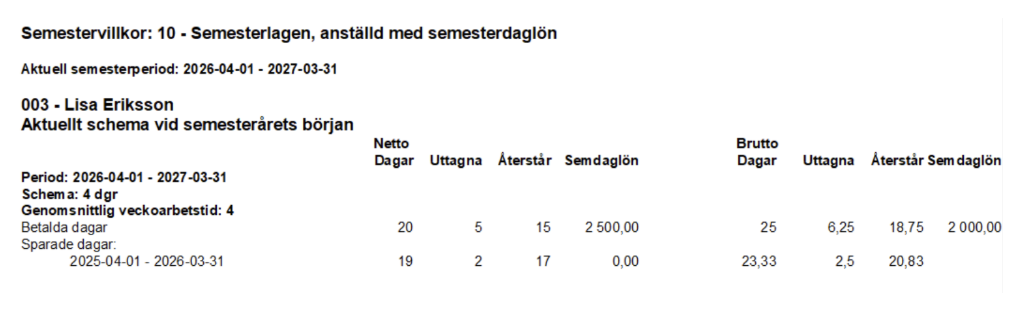
You can now enter the information in Spiris Payroll.
- Open Spiris Payroll.
- Make sure the employee has the same work schedule in Spiris Payroll as in Visma Lön 300/600.
If the employee registers their time in Employee, the current work schedule is automatically transferred to Spiris Payroll.
For employees who don’t register time in Employee, you need to add the work schedule manually. Go to Payroll – Employees, the Employment tab, and click the pencil icon. Select Add work schedule and choose the same schedule the employee had in Visma Lön 300/600.
- Select Payroll - Employees and select the employee.
- Select the Holiday tab.
- Enter the gross value for the total number of paid holiday days in the field Paid, Total. You’ll find the value in the column Brutto, Dagar in the report Nettosemestervärden (25 days in the example).
When you enter the gross days, the net days are calculated automatically (20 days in the example).
- For employees with holiday term 10, also enter the holiday pay per day in the field Holiday per day, gross. You’ll find the value under Brutto, Sem daglön in the report (2 000 SEK in the example). When you enter the gross value, the net value is calculated automatically and should match the value in the column Netto, Sem daglön in the report (2 500 SEK in the example).
- Select the tab Input values.
- Enter the number of used net holiday days in the field Paid, Used under the heading Holiday. You’ll find the value in the column Netto, Uttagna in the report (5 days in the example).
- Go back to the Holiday tab.
- Check that the number of remaining paid holiday days matches the value in the column Netto, Återstår in the report (15 days in the example). If there are unpaid days or advance days, enter them in the same way.
-
Enter the number of saved gross days in the field Saved days under the heading Values for saved holiday for each holiday period. You’ll find the value in the column Brutto, Återstår in the report (20.83 days in the example).
The net days are calculated automatically (17 days in the example). Only enter the remaining days, so used saved days shouldn’t be entered.
If any net value doesn’t match after you’ve entered the gross value manually, adjust the gross value until the net value matches the report. This can happen, for example, if the employee changed schedule during the year in Visma Lön 300/600 or if a value was adjusted manually. The most important thing is that the remaining net days and net holiday pay per day in Spiris Payroll match the information in Visma Lön 300/600.
Related topics
Checklist when switching to Spiris Payroll as a company (in Swedish)
Checklist when switching to Spiris Payroll as an accounting office (in Swedish)
Work smarter
Video tutorials
Payroll management
Get help with your questions about payroll management in our forum